
The animated route
The whole route from above, pass by pass, before you set off.
With «Watch the animated route», below the route map, the route plays by itself full screen over the aerial photo (the background can be changed): the line draws itself with the bike on it and the camera follows. It is in «Your routes», on shared maps and in the app.
A real example
An example route from Vic, on its shared map: open it and press «Watch the animated route».
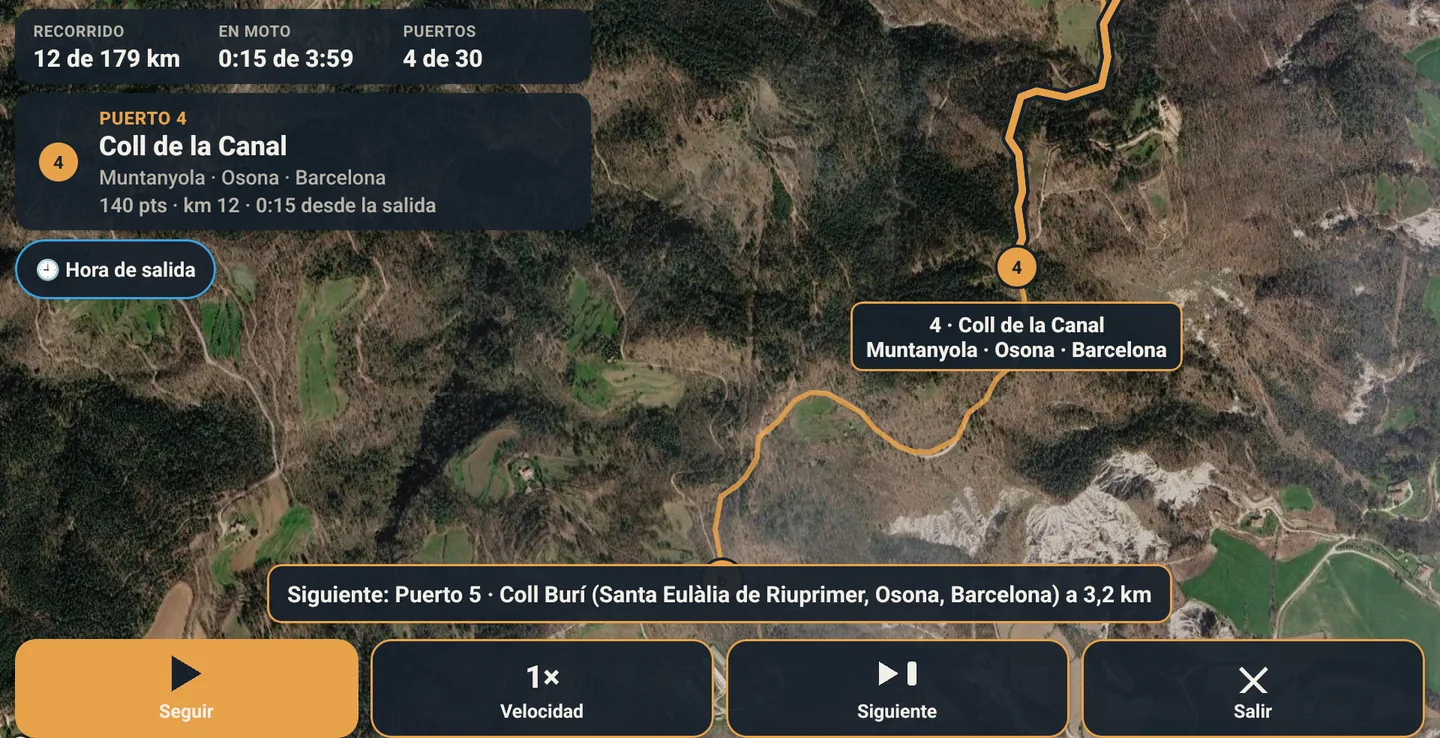
What it shows
- At each place (the start, every numbered pass, the fuel stations, the night stop and the arrival) it zooms in, shows the name and its card and stops for a few seconds.
- Counters: km ridden, riding time, passes («Passes 5 of 19») and points; and the km of special stage, links, off-road and tarmac.
- At the start of each stretch, a note («25 km off-road», «15 km tarmac»); and before moving on, «Next: … in X km».
- With the start time, the expected time at each place and at the arrival; at fuel stations, the 15-minute stop.
The controls
Start, pause and resume
With its button or the space bar. It opens paused, so you can enter the start time first if you want.
Speed
From 0.5× to 4×, with its buttons or + and −.
Next
Jumps to the next place (→ key).
Zoom
Zoom in and out (I and O), or back to automatic zoom.
Exit
With its button or Esc.